
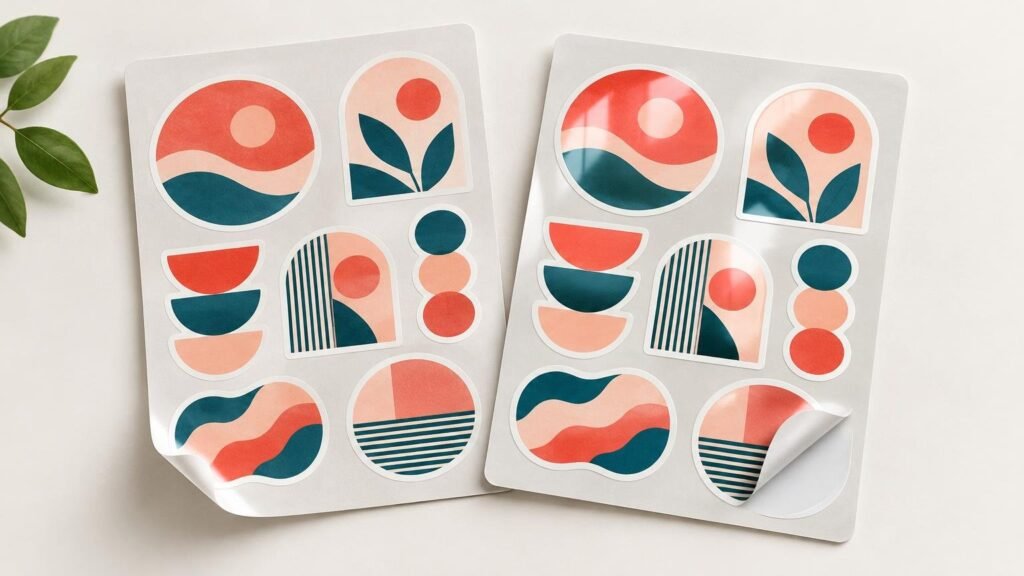
Choose matte stickers when low glare, a softer appearance, or easier viewing under direct light matters most. Choose glossy stickers when you want shine, stronger visual pop, and a slicker finished surface. Neither option is automatically better or more durable: the right choice depends on the artwork, viewing conditions, application surface, and complete sticker construction.
That last point matters when ordering. Matte and gloss describe the finish, not the entire product. The face material, adhesive, ink, laminate or coating, and application conditions all affect how a sticker performs. Avery, for example, shows matte and gloss finishes across multiple paper and film constructions rather than treating each finish as one universal material.
Matte and glossy stickers at a glance
| Factor | Matte finish | Gloss finish |
|---|---|---|
| Glare | Lower glare; easier to view in bright or directional light | More reflections under strong light |
| Color impression | Softer and more subdued | Brighter-looking, with more visual pop |
| Surface feel | Typically smoother and less slick | Typically slicker and shinier |
| Photography | Usually easier to photograph without reflected highlights | Can show lights, windows, and camera reflections |
| Good starting point | Detailed text, understated branding, photographed products | Colorful artwork, promotional graphics, bold logos |
| Main caution | Dark colors may feel less visually intense | Glare can obscure small details at some angles |
These are practical tendencies, not guarantees. A matte paper label, laminated matte vinyl sticker, and matte-clear film can look and feel quite different. Glossy constructions also vary. Always compare the finish within the exact sticker or label product you plan to order.
How the finish changes color and contrast
Gloss reflects more light and commonly gives colorful artwork a livelier, more polished appearance. It suits saturated illustrations, promotional handouts, creator merchandise, and logos designed to stand out at a glance. The tradeoff is that reflected light can temporarily hide parts of the design, especially on a curved bottle or near a window.
Matte diffuses reflections, producing a quieter appearance. It often works well for restrained branding, detailed line art, small informational stickers, and packaging photographed for online listings. It does not remove the need for adequate contrast, however. Pale gray text on a light background can still be difficult to read even without glare.
Do not try to simulate the finish by simply making the artwork darker or more saturated. Screens emit light, while printed stickers reflect it. Review the actual colors, dimensions, and finish selection during proofing, and expect some difference between an illuminated display and the physical print.
Feel depends on more than the word “matte”
Matte is often described as softer or more subdued, while gloss generally feels slicker. YouStickers uses this distinction for its standard custom-sticker offering, which pairs durable vinyl with a matte or gloss laminate. The laminate contributes both appearance and surface protection, but that does not prove that one finish is always more durable across every sticker and label construction.
The same production questions apply when reviewing CustomStickers custom stickers, labels, and artwork-preparation services: identify the face material, finish, adhesive, and intended use instead of choosing from appearance alone.
Choose the finish around the real use
Product packaging and ecommerce photography
Matte is a strong starting point for jars, boxes, pouches, and mailers that will be photographed regularly. Lower glare gives you more freedom when placing lights and can keep reflected highlights from crossing a logo or product name. Gloss can still be the better choice when a bright, polished shelf appearance is more important than easy photography.
Laptops, water bottles, and creator merchandise
For bold illustrations and colorful merch, gloss can make the design feel more energetic. Matte may better suit line art, muted palettes, or designs intended to blend naturally with a laptop or notebook surface. For bottles and frequently handled items, confirm the material, adhesive, and laminate rather than assuming the finish determines durability.
Informational labels and barcodes
Low glare can help when a label contains small text or machine-readable codes. High-gloss materials can cause reflectance problems for some barcode readers under particular lighting and scanning angles, a compatibility issue identified by both ISO’s technical report on substrate gloss and GS1 guidance.
That does not mean every glossy barcode will fail. Scan performance also depends on contrast, print definition, code dimensions, quiet zones, placement, package shape, lighting, and scanner geometry. For retail UPC symbols, the GS1 US barcode printing guidelines recommend dark bars on a light background, adequate unprinted quiet zones, and avoiding arbitrary resizing. Test the finished label on the actual package and verify it with the intended scanning system when reliable reading is operationally important.
Specialty materials need a separate decision
Do not automatically carry a standard vinyl recommendation over to clear, holographic, chrome, sticker-sheet, or roll-label products. The base material may change how the finish behaves. On clear film, for example, a matte finish can create a slightly frosted effect, while gloss may look more like printing directly on the surface. That observation is material-specific rather than a rule for every clear sticker.
White underprinting also matters on clear and metallic materials. White ink can make selected colors opaque while uncovered areas retain the base effect. Confirm which areas receive white ink and whether the chosen finish supports the intended contrast. Specialty-finish availability and defaults should be checked on the current product page or proof rather than assumed from standard vinyl options.
What to inspect on the proof
The digital proof is the last practical checkpoint before the design becomes a physical object. YouStickers’ published workflow includes uploading artwork, reviewing an online proof and cutline, approving it, and then moving into production. A proof cannot perfectly reproduce physical shine on a screen, but it should establish the selected finish and the production geometry.
- Confirm that the order and proof identify the intended matte or gloss finish.
- Check the final dimensions rather than judging only by the enlarged screen preview.
- Inspect the cutline, border consistency, and distance between important content and the trim.
- Look for small text or fine details that glare could make harder to read in the intended environment.
- For clear or specialty materials, confirm transparent areas and white-underprint intent.
- For barcodes or QR codes, verify size, contrast, clear space, placement, and finished-item scanning.
- Make sure the finish belongs to the exact material and product format being ordered.
For a fuller walkthrough of artwork, size, shape, material, and approval decisions, see how to order custom stickers online.
The practical verdict
Matte is usually the safer choice when glare control, understated presentation, product photography, or steady readability is the priority. Gloss is usually the stronger choice when shine, vivid visual impact, and a polished promotional look matter more.
Make the final decision in context. Picture the sticker at its real size, on its real surface, under the light where people will see or scan it. Then verify the material, laminate or coating, adhesive, finish, cutline, and dimensions on the proof. That production-level check matters far more than treating matte or gloss as a universal winner.
References
- Compare Label & Sticker Materials | Avery WePrint™ | Avery.com
- Custom Sticker Printing | Quality Vinyl | YouStickers
- ISO/IEC TR 19782:2006 – Information technology — Automatic identification and data capture techniques — Effects of gloss and low substrate opacity on reading of bar code symbols
- Implementation Guideline
- Barcode Placement & Printing Guidelines | GS1 US
- Frequently Asked Questions – YouStickers
